Supported application platforms
Know where autofill works before you apply.
Ten named ATS platforms have dedicated field matching, 18 more application sites use the shared form matcher automatically, and 28 platforms can be enabled only when you need them.
Platform directory
Start with the site on your screen.
Every platform listed here has dedicated detection and autofill handling. Workday and Greenhouse also have step-by-step guides.
What supported means
Less repetitive typing. Clear control over every answer.
Support is more than recognizing the page. It means connecting your reviewed profile to the right fields while keeping the final application in your hands.
Reusable profile fields
Contact details, links, work history, education, authorization, and other answers you have reviewed and saved.
Platform-specific matching
Dedicated handling finds the right controls across each named ATS instead of treating every form as identical.
Job-specific questions
When a supported form includes an open question, AI can draft a starting point from the job context for you to review.
Review before submission
JobOfferMaster fills the form, then leaves you in control to check every answer and submit the application yourself.
Coverage at a glance
Ten dedicated ATS workflows, named and inspectable.
Employer forms can still add custom questions, but the repeated application workflow is supported across every platform below.
| Platform | Best fit | Autofill coverage | Guide |
|---|---|---|---|
Workday Supported | Multi-step employer application flows with repeated profile and authorization fields. | Repeated fields from your saved profile, plus job tracking. | Workday guide |
Greenhouse Supported | Applications that mix reusable profile fields with role-specific questions. | Repeated fields from your saved profile, plus job tracking. | Greenhouse guide |
Lever Supported | Shorter applications that still benefit from reusable profile data and a shared tracker. | Repeated fields from your saved profile, plus job tracking. | Autofill guide |
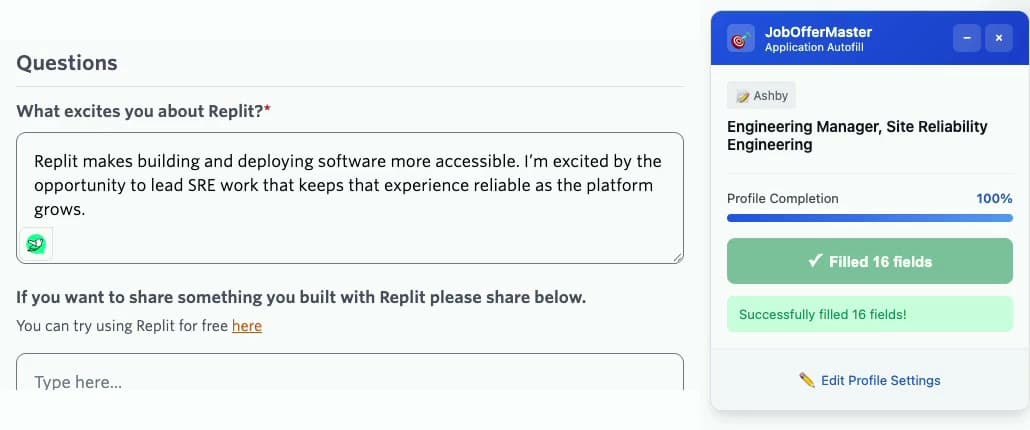
Ashby Supported | Applications that combine reusable details with role-specific follow-up questions. | Repeated fields from your saved profile, plus job tracking. | Autofill guide |
Jobvite Supported | New graduates applying through several employer career sites. | Repeated fields from your saved profile, plus job tracking. | Autofill guide |
iCIMS Supported | Longer applications with repeated sections and stronger post-apply tracking needs. | Repeated fields from your saved profile, plus job tracking. | Autofill guide |
Zoho Recruit Supported | Smaller recruiting pipelines where consistency matters more than one-off submissions. | Repeated fields from your saved profile, plus job tracking. | Autofill guide |
Rippling Supported | Entry-level applications across smaller companies and startups. | Repeated fields from your saved profile, plus job tracking. | Autofill guide |
SmartRecruiters Supported | New graduates who want application tracking and follow-up in one place. | Repeated fields from your saved profile, plus job tracking. | Autofill guide |
Paycom Supported | New graduates applying through several employer career sites. | Repeated fields from your saved profile, plus job tracking. | Autofill guide |
Additional application sites
Eighteen more sites use shared form matching.
These sites are recognized automatically and use JobOfferMaster's shared matcher for standard profile fields. Custom components can still vary, so review every answer before you submit.
Workable
Shared form matching
BambooHR
Shared form matching
Oracle Recruiting
Shared form matching
Taleo
Shared form matching
Dayforce
Shared form matching
Recruitee
Shared form matching
JazzHR
Shared form matching
Breezy HR
Shared form matching
Dover
Shared form matching
UltiPro / UKG
Shared form matching
Adobe Careers
Shared form matching
Eightfold
Shared form matching
Freshteam
Shared form matching
Pinpoint
Shared form matching
Gem
Shared form matching
Microsoft Careers
Shared form matching
Tesla Careers
Shared form matching
Amazon Jobs
Shared form matching
Stripe Careers
Shared form matching
Meta Careers
Shared form matching
A company-hosted or custom application domain can still be enabled for the current site from the extension popup. Chrome asks for that site's permission before JobOfferMaster runs autofill there.
Enable when needed
Twenty-eight more platforms, without blanket site access.
Open the extension on one of these application sites and choose Enable autofill on this site. Chrome grants access only to that employer origin, and JobOfferMaster remembers the permission.
ADP Recruiting
Shared form matching
Apple Careers
Shared form matching
Avature
Shared form matching
ByteDance Careers
Shared form matching
Comeet
Shared form matching
Cursor Careers
Shared form matching
GovernmentJobs
Shared form matching
Google Careers
Shared form matching
Gusto Recruiting
Shared form matching
IBM Careers
Shared form matching
Indeed Smart Apply
Shared form matching
JobScore
Shared form matching
Mechanize
Shared form matching
Naukri
Shared form matching
Netflix Jobs
Shared form matching
Okta Careers
Shared form matching
Paylocity
Shared form matching
Polymer
Shared form matching
Roblox Careers
Shared form matching
SAP SuccessFactors
Shared form matching
SEEK
Shared form matching
Tal.net
Shared form matching
Teamtailor
Shared form matching
TikTok Careers
Shared form matching
TriNet Hire
Shared form matching
Uber Careers
Shared form matching
Waymo Careers
Shared form matching
What autofill cannot know for you
A field cannot be filled when the answer is not saved in your JobOfferMaster profile.
Employer-specific questions may still need your judgment, context, or a new answer.
Application sites change. Review the page after autofill and report anything that looks wrong.
JobOfferMaster does not make the final submission decision. You review and submit the form.
Ready before the next application
Set up once, then move through forms faster.
Build your profile once
Import a resume, review the extracted details, and add anything you want available for autofill.
Open your profileOpen a supported application
Use the Chrome extension on a Workday, Greenhouse, Lever, Ashby, or another supported form.
Get the extensionAutofill, review, then apply
Fill the repeated fields in seconds, check the employer-specific questions, and submit when you are ready.
See the full workflowYour next application
Bring your profile to the form, not the other way around.
Install JobOfferMaster, save your details once, and spend less time rebuilding the same application.